All about Fire Extinguishers in Nepal
May 27th 2026

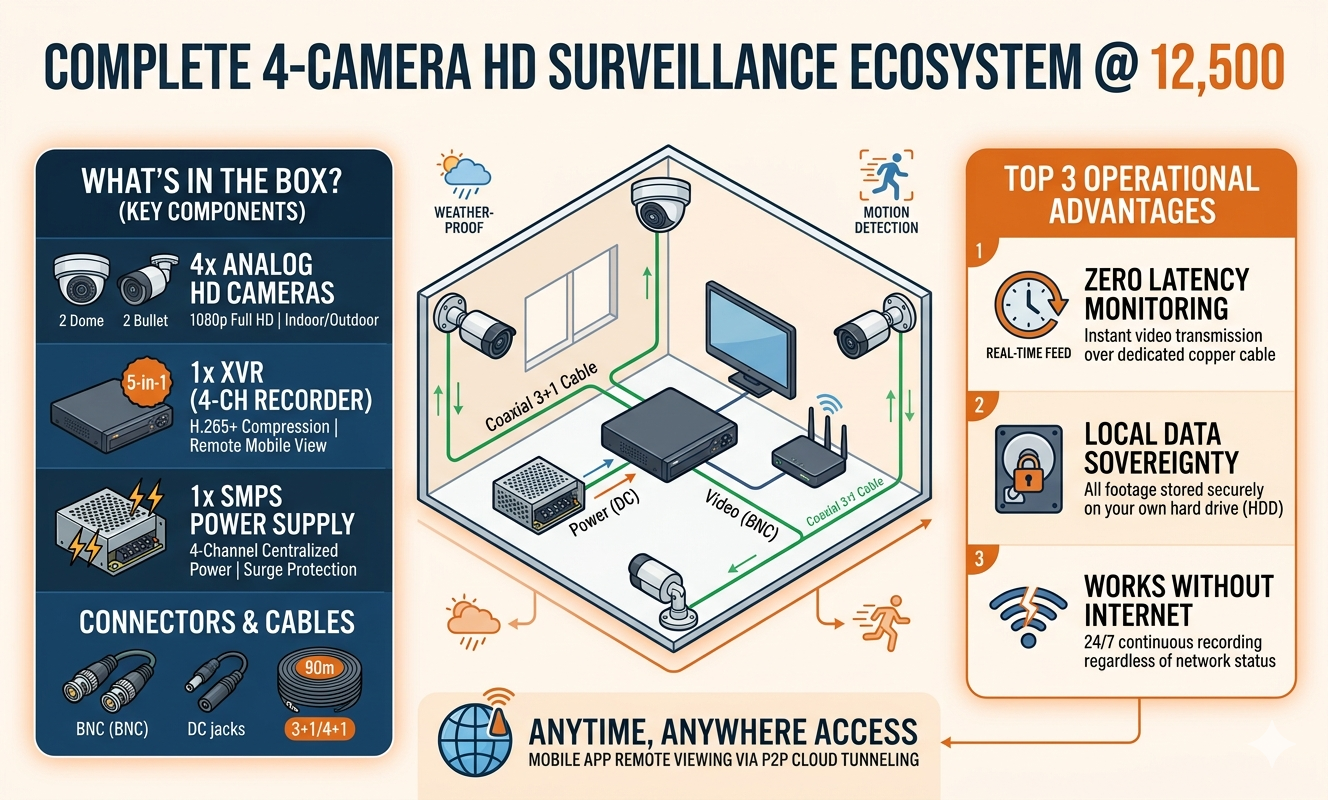
In an era where security is no longer a luxury but a necessity, the market is flooded with high-end IP systems that can break the bank. However, for small business owners, homeowners, and shopkeepers, the "sweet spot" of surveillance often lies in Analog HD technology.
Today, we are breaking down the components, benefits, and installation of a comprehensive 4-camera setup that costs just 12,500. This isn't just about cameras; it’s about a complete ecosystem that includes the XVR, power supplies, and essential connectors.
| Component | Quantity | Description. | |
| Analog HD Cameras | 4 | 4Usually a mix of 2 Dome (Indoor) and 2 Bullet (Outdoor) cameras. | |
| XVR (5-in-1) | 1 | A 4-Channel recorder supporting HD-TVI, CVI, AHD, CVBS, and IP. | |
| SMPS Power Supply | 1 | A centralized 4-Channel 12V DC power box. | |
| BNC Connectors | 8 | Used to transmit video signals from camera to XVR. | |
| DC Jacks | 4 | To provide power to the cameras. | |
CCTV Cable Roll | 45 Meters | Coaxial cable with integrated power wire (3+1 or 4+1). |
When you purchase a full kit at this price point, you are getting a "Plug and Play" solution. Here is the typical bill of materials:
At the 12,500 price point, you typically receive 2.4 MP (1080p) Full HD cameras.
Dome
Cameras:
Designed for indoor use. They are discreet and have a
wide-angle lens to cover rooms.
Bullet
Cameras:
Built with IP66 or IP67 weatherproofing for outdoor use.
Their "arm" design makes them a great visual deterrent.
Unlike older DVRs, a modern XVR is "cross-compatible." This means it can handle various signal types.
H.265+
Compression:
This is crucial. It shrinks your video files without
losing quality, allowing you to store more days of footage on a standard
Hard Drive.
Remote
Viewing:
Most XVRs in 2026 come with cloud P2P support, letting you
watch your cameras on your smartphone via an app.
The Switched Mode Power Supply (SMPS) is a centralized box that takes your home's 220V AC and converts it to a stable 12V DC for the cameras. Using a centralized SMPS is safer than individual adapters because it includes surge protection.
BNC (Bayonet Neill–Concelman): These twist-lock connectors ensure the video signal doesn't drop.
DC Jack: This connects the power wire from your cable to the camera's power port.
You might wonder why you shouldn't just buy a Wi-Fi camera. While IP cameras have their place, the Analog HD set at 12,500 offers three major advantages:
Zero Latency: The video feed is instant. There is no "lag" or "buffering" because the signal travels over a dedicated copper wire.
Cost-Effectiveness: You get four high-quality "fixed" points of view for the price of one or two high-end IP cameras.
No Internet Required: The system records 24/7 to a local hard drive even if your Wi-Fi goes down.
Installing a wired system is simpler than it looks.
Step 1: Positioning
Mount your Bullet cameras at entry points (front door, back gate) and Dome cameras in common areas (living room, cashier counter). Aim for a height of 8–10 feet to prevent tampering.
Step 2: Cabling
Run the 3+1 CCTV cable from the XVR location to each camera. The "3" refers to the thin wires for power and audio, while the "1" is the thick coaxial cable for video.
Step 3: Terminating
Strip the ends of the cables and attach the BNC connectors for video and DC jacks for power.
Pro Tip: Use a waterproof junction box at the camera end to hide the connectors and protect them from rain.
Step 4: Configuration
Connect the XVR to a monitor via HDMI. Follow the startup wizard to set your password and recording schedule (e.g., Motion Detection vs. Continuous Recording).
To ensure your 12,500 investment lasts for years, follow these simple steps:
This 4-camera set is ideal for:
At 12,500, this package offers the best "Price-to-Security" ratio available in 2026. It provides professional-grade reliability without the professional-grade price tag.
Do you have questions about which brand (Hikvision, CP Plus, or Dahua) fits best within this budget?
Legacy analog systems (CVBS) were limited to standard definition (roughly 480p), resulting in grainy, "pixelated" footage. Analog HD (AHD/TVI/CVI) uses the same coaxial infrastructure but employs advanced modulation to transmit 1080p Full HD signals. This allows for high-definition facial recognition and license plate capture without the high cost of IP-based networking.
Yes. While the system records locally to an XVR, the recorder features an Ethernet port. By connecting it to your router, you can use a dedicated mobile app (via P2P Cloud technology) to stream live footage and playback recordings from anywhere in the world, provided you have an internet connection on both ends.
Typically, at the 12,500 price point, the Hard Drive (HDD) is sold separately. This is because storage requirements vary based on the user's needs. A 1TB Surveillance Grade HDD usually provides 15–20 days of continuous recording for 4 cameras using H.265+ compression.
The difference is primarily in the form factor and environmental rating:
An SMPS (Switched Mode Power Supply) acts as a centralized power hub. It is more efficient, produces less heat, and includes built-in surge protection. If a power spike occurs, the SMPS protects the cameras from frying. It also makes for a much cleaner installation with fewer wires dangling near your power outlets.
Yes. Modern XVRs are "Pentabrid" or "5-in-1" devices. They support the five major signal types: AHD, TVI, CVI, CVBS, and IP. This cross-compatibility ensures that if you decide to add a different brand's camera later, it will likely be "plug-and-play" compatible.
For the 3+1 Coaxial cable provided in this kit, you can safely run up to 300 meters without significant signal degradation. For distances beyond 500 meters, specialized video baluns or active signal repeaters would be required to maintain 1080p clarity.
Most standard 12,500 kits focus on video. However, many modern Analog HD cameras now feature AoC (Audio over Coax) technology. This allows the camera to send audio signals through the same BNC cable without extra wiring. Check if your specific kit supports "Audio over Coax" if sound recording is a priority.
The XVR is designed for Cyclic Recording. Once the storage reaches capacity, the system automatically overwrites the oldest footage with the newest data. You never have to manually delete files to make room for new recordings.
If you can use a power drill and strip a wire, you can install this kit. The most time-consuming part is routing the cables from the cameras back to the XVR. The connections themselves are simplified: the BNC twists into place, and the DC Jack plugs directly into the camera's power pigtail.
May 27th 2026

June 5th 2026




Quick and delivery of innovative fire safety and electronic security solutions for better convenience and additional assurance

Delivery and installation of security products before payment for trust and customer satisfaction

24/7 technical support from security experts to solve all your queries, concerns, and curiosities